
Pictures appear too dark
- Is the camera in b (auto) mode?
- In b mode, the camera automatically adjusts ISO sensitivity for optimal exposure. Select b mode and try again. If desired exposure is not achieved in b mode, you can select another mode and check the following.
- Is the shutter speed appropriate?
- Pictures may be underexposed if you select a fast shutter speed in S (shutter-priority auto) or M (manual) mode. Select a slower shutter speed.
- Is the exposure compensation value appropriate?
-
The camera will shift the optimal exposure value to darken the entire image if exposure compensation is set to a negative value. Select a positive value to adjust the exposure.
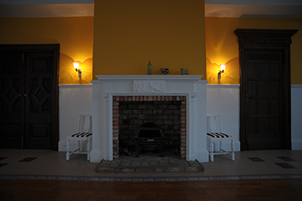
−1 EV
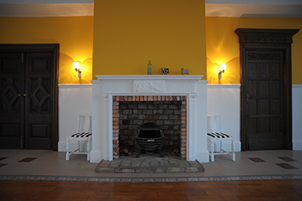
No exposure compensation
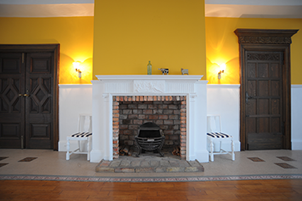
+1 EV
- Is the aperture appropriate?
- Pictures may be underexposed if you select a small aperture (the higher f-number) in A (Aperture-priority auto) or M (manual) mode. Select a larger aperture (the lower f-number).
- Is auto ISO sensitivity control (ISO AUTO) enabled?
- Low ISO sensitivities may cause pictures taken in dark environments to appear too dark. When auto ISO sensitivity control (ISO AUTO) is enabled, the camera automatically adjusts the ISO sensitivity if optimal exposure cannot be achieved at the value selected by the user in modes P, S, A, and M.
- Is an appropriate metering mode selected?
- When [Matrix metering] is selected, the camera meters a wide area of the frame, and the subject may appear dark when shooting in backlit conditions or when there is a large difference in brightness between the subject and background. Selecting [Highlight-weighted metering] may cause the main subject to be underexposed if there is a bright light source or the background is brighter than the subject. Select a metering mode that suits your subject.