Nikon

عربي

Български

Čeština

Dansk

Deutsch

Ελληνικά

English

Español

Eesti

Suomi

Français

हिन्दी

Magyar

Indonesia

Italiano

日本語

Қазақ

한글

Lietuvių

Latviski

Nederlands

Norsk

Polski

Português

Română

Русский

Slovenčina

Slovenščina

Српски

Svenska

ภาษาไทย

Türkçe

Українська

简体中文

繁體中文

Select language

Taking Pictures

 Return to the Reference Guide

Troubleshooting/
FAQs

1 Taking Pictures (Taking Photographs)

Follow the steps below to take photographs.

  1. Select photo mode by rotating the photo/video selector to C.
  2. Rotate the mode dial to AUTO (b).
  3. Frame the photograph.

    You can use the lens zoom ring to adjust the angle of view.

  4. To focus, press the shutter-release button halfway (i.e., lightly press the shutter-release button, stopping when it is pressed halfway).
  5. Without lifting your finger from the shutter-release button, press the button the rest of the way down to take the picture.

2 Taking Pictures (Playback)

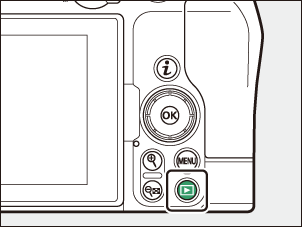
Press the K button to view photos in the monitor after shooting.

This completes taking and viewing photos.

In the next Step, we will introduce how to connect the camera to a smart device and download pictures.

Proceed to the Next Step 

Proceed to Step 4 to skip connecting to a smart device.

Proceed to Step 4