
Getting Ready
1 Getting Ready (Attaching the Strap)
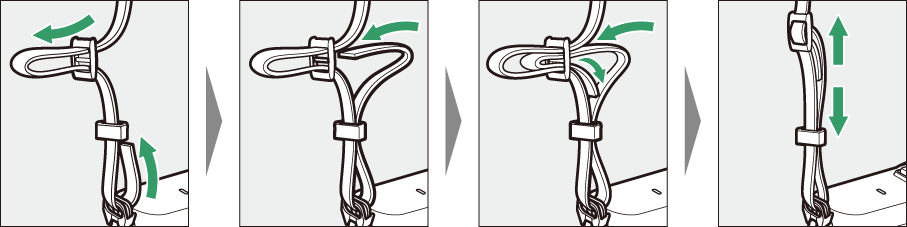
Attach the camera strap.
Attach the strap securely to the camera eyelets.
2 Getting Ready (Inserting the Battery)
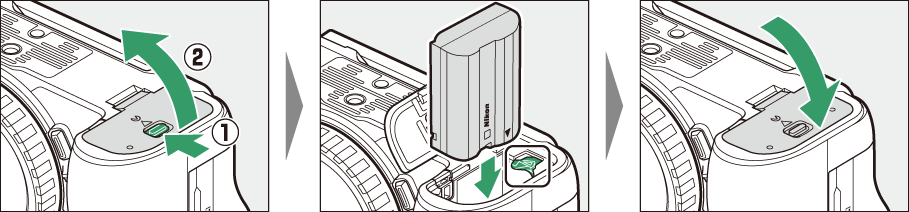
Insert the battery.
Turn the camera off before inserting the battery.
3 Getting Ready (Charging the Battery)
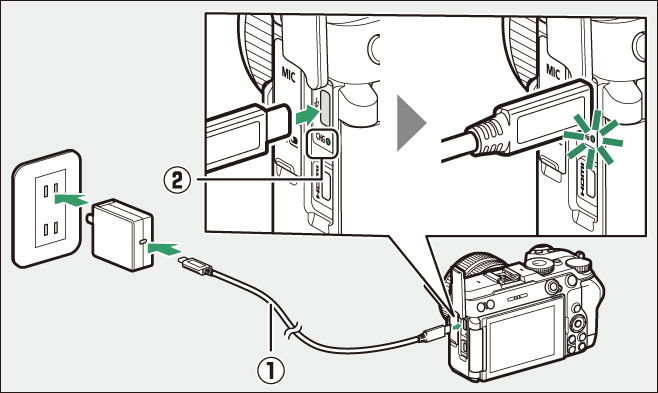
The shape of the plug varies with the country or region of purchase.
Charge the battery.
Connect the camera to an optional EH-8P AC adapter using the supplied USB cable (q) to charge the battery. The camera charge lamp (w) lights amber while charging is in progress. The lamp turns off when charging is complete.
You can also use third-party AC adapters and portable chargers with a minimum output of 27 W (9 V/3 A), equipped with USB Type-C connectors that support USB PD (power delivery) to charge the camera battery.
Caution: Charging with Third-Party AC Adapters or Portable Chargers
We do not guarantee that all third-party AC adapters and portable chargers will be able to charge the camera battery.
4 Getting Ready (Inserting a Memory Card)
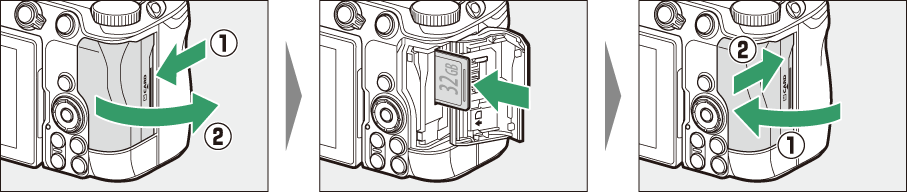
Insert a memory card.
Turn the camera off before inserting a memory card.
5 Getting Ready (Attaching a Lens)
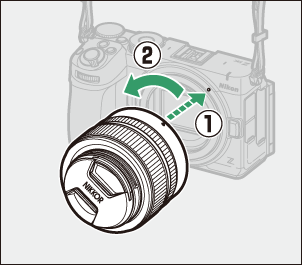
Attach a lens.
Align the mounting mark on the lens with the matching mark on the camera body (q) and rotate the lens in the direction shown (w) until it clicks into place.
6 Getting Ready (Turning the Camera On)
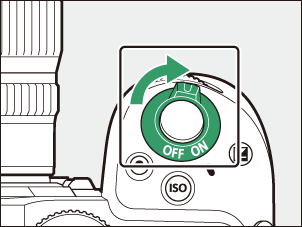
Turn the camera on.
Rotate the power switch to the “ON” position as shown to turn the camera on.
7 Getting Ready (Camera Setup)
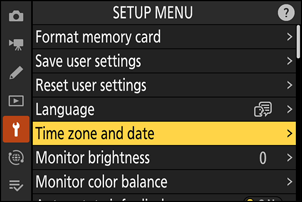
Choose a language and set the camera clock.
Before using the camera for the first time, select a time zone and set the clock so that the correct time and date will be recorded with any pictures you take.
The camera is now ready for use.
In the next Step, we will introduce how to take and view pictures.