
New options for Custom Settings f2 [Custom controls (shooting)] and g2 [Custom controls]
The roles that can be assigned to buttons and other controls in Custom Settings f2 [Custom controls (shooting)] and g2 [Custom controls] have been changed.
- Exposure compensation, ISO sensitivity, white balance, or color temperature can be assigned to the command dials in mode M
- Functions changed in g2 [Custom controls]
Exposure compensation, ISO sensitivity, white balance, or color temperature can be assigned to the command dials in mode M
For [Command dials] in Custom Setting f2 [Custom controls (shooting)] or g2 [Custom controls], the name of the [Exposure setting] option has been changed to [Exposure setting/Subfunction].
Along with this change, exposure compensation (E), ISO sensitivity (9), white balance (m), or color temperature (K) can be assigned to the command dials in mode M.
- Select mode M on the [Exposure setting/Subfunction] setting screen, and move the zoom control toward - to set the roles of the main and sub-command dials.
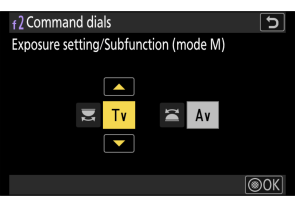
- Press the multi selector left or right to select a command dial, and press the multi selector up or down to assign a function.
- If ISO sensitivity (9) is assigned via g2 [Custom controls], [ISO sensitivity (mode M)] is available for [ISO sensitivity settings] in the video recording menu. If [R3D NE 12-bit (R3D)] is selected for [Video file type] in the video recording menu, [ISO sensitivity] is available for [ISO sensitivity settings].
Functions changed in g2 [Custom controls]
In Custom Setting g2 [Custom controls], the name of the [View assist] option assignable to a control has been changed to [3D LUT/View assist]. The options that can be switched using the control are as follows:
| Option | Description | |
|---|---|---|
| m | [3D LUT/View assist] | For 3D LUTs, Custom Setting g16 [3D LUT settings] > [3D LUT] cycles through [Enable (monitor)], [Enable (HDMI priority)], and [Disable] each time the control is pressed. For view assist, Custom Setting g15 [View assist] toggles between [ON] and [OFF] each time the control is pressed.
|