Nikon

عربي

Български

Čeština

Dansk

Deutsch

Ελληνικά

English

Español

Eesti

Suomi

Français

हिन्दी

Magyar

Indonesia

Italiano

日本語

Қазақ

한글

Lietuvių

Latviski

Nederlands

Norsk

Polski

Português

Română

Русский

Slovenčina

Slovenščina

Српски

Svenska

ภาษาไทย

Türkçe

Українська

简体中文

繁體中文

Select language

New Custom Settings: a10/g6 “Active Subject Detection Options

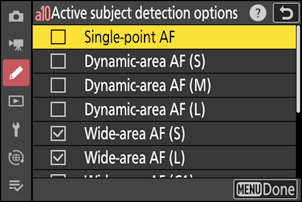
We have added an [Active subject detection options] item to the Custom Settings menu at positions a10 and g6. You can enable or disable subject detection for each AF-area mode.

  • Highlight options and press J or 2 to select (M) or deselect (U). Subject detection is enabled only when an AF-area mode marked with a check (M) is selected in autofocus mode.
  • To complete the operation, press G.
  • The setting for Custom Setting a10 applies in photography and that for g6 in video recording.