
New Options for “Connect to Other Cameras” in Network Menu
We have added new features to the [
Automatic Copyright Information Overwriting for Remote Cameras Is Now Available
Connecting remote cameras to the master camera now automatically overwrites the copyright information on remote cameras with the copyright information stored on the master camera. Enable overwriting by selecting [Connect to other cameras] > [Overwrite copyright info] in the master camera’s network menu.
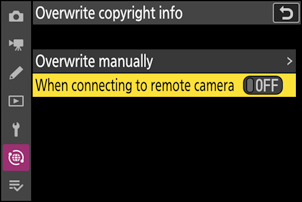
| Option | Description |
|---|---|
| [Overwrite manually] | Pressing J overwrites the copyright information on any remote cameras currently connected in the same group with the copyright information stored on the master camera. |
| [When connecting to remote camera] | Selecting [ON] overwrites the copyright information on the remote cameras with the copyright information stored on the master camera when connected. |
Search and Addition of Remote Cameras on the Same Network from the Master Camera Is Now Available
The master camera can now detect and connect to remote cameras on the same network.
Detecting and Connecting to Remote Cameras
Connect all the master and remote cameras to the same network using [Connect to other cameras] in the network menu.
- Connect the cameras via a wireless or Ethernet LAN. See the camera Reference Guide for detailed instructions on connecting the cameras to the network.
- Set the same group name for all the master and remote cameras using [Group name]. A remote camera with a different [Group name] will not be detected.
Go to [Connect to other cameras] > [Group settings] > (group display name) on the master camera, highlight [Remote camera list], and press 2.
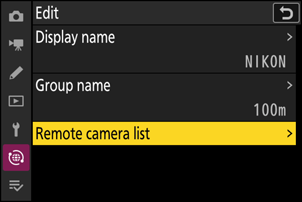
Press X on the remote camera list.
The master camera searches connectable remote cameras and displays their IP addresses.
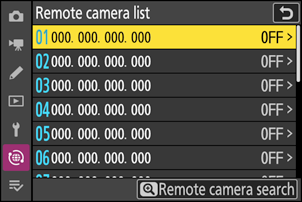
Select a remote camera.
Highlight the remote camera and press 2 to select (M) or deselect (U). The remote cameras with check (M) marks will connect to the master camera.
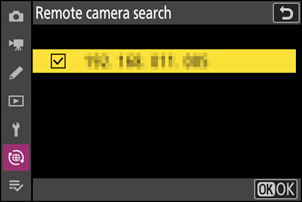
Press J.
The master camera will connect to the selected remote cameras. The master camera shows the group display name (q) and the number of remote cameras connected and not yet connected (w).
