New Options for Custom Settings f2 “Custom Controls (Shooting)” and g2 “Custom Controls”
Additional roles are now available for Custom Settings f2 [
New Roles
| Option | Description | |
|---|---|---|
| X | [Focus limiter] | Press the control to toggle between [ON] and [OFF] for Custom Setting a17 [Focus limiter setting] > [Focus limiter]. Hold the control to jump to the [Limit range] settings display (0 New Custom Setting: a17 “Focus Limiter Setting”). |
| F | [Cycle subject detection options] | Press the control to cycle through the subject detection targets during autofocus.
|
Separate Settings Now Available for “Recall Shooting Functions” and “Recall Shooting Functions (Hold)”
The [Recall shooting functions] and [Recall shooting functions (hold)] items shared recall settings in earlier versions of the camera firmware, but starting with “C” firmware version 5.30, the camera will store separate settings for each item.
Assigning “Recall Shooting Functions” and “Recall Shooting Functions (Hold)” to Different Controls
Storing separate settings to different controls using [Recall shooting functions] and [Recall shooting functions (hold)] varies operations depending on the order in which the controls are pressed.
- The setting stored with [Recall shooting functions (hold)] will not be recalled by pressing its assigned control while the control assigned to [Recall shooting functions] is pressed.
- The setting stored with [Recall shooting functions] will be recalled when you press its assigned control while the setting recalled using [Recall shooting functions (hold)] is in effect.
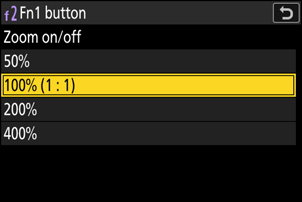
Changed Settings for “Zoom On/Off”
A magnification option of [400%] has been added to [Zoom on/off] available for Custom Settings f2 [Custom controls (shooting)] and g2 [Custom controls]. We also changed the names of other options to:
- [50%]
- [100% (1 : 1)]
- [200%]