New Picture Control Options
We have added new items to [
New Items Added to Picture Control
The following items have been added to [Set Picture Control] in the photo shooting and video recording menus.
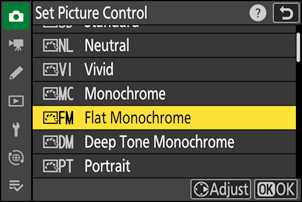
| Option | Description | |
|---|---|---|
| 2 | [ |
Features gentle gradations from highlights to shadows, producing soft monochrome pictures. |
| 3 | [ |
Choose for slightly darker tones in the range from shadows to mid-tones, with brightness rapidly increasing as tones progress from mid-tones to highlights. |
- [Flat Monochrome] and [Deep Tone Monochrome] have also been added to the original Picture Control on which the custom Picture Control is based in [Manage Picture Control] in the photo shooting and video recording menus.
Limits When Using “Flat Monochrome” and “Deep Tone Monochrome”
The [Portrait impression balance] options in the photo shooting and video recording menus are disabled when using [Flat Monochrome] and [Deep Tone Monochrome].
Picture Control Settings
The options available when [Flat Monochrome] or [Deep Tone Monochrome] is selected are as follows.
[Quick sharp]
- [Sharpening]
- [Mid-range sharpening]
- [Clarity]
- [Contrast]
- [Brightness]
- [Filter effects]
- [Toning]
Using “Filter Effects” with “Deep Tone Monochrome”
[Deep Tone Monochrome] features a strong built-in red filter effect that applies even when [OFF] is selected for [Filter effects]. Because [Filter effects] cannot be applied more than once, selecting an option other than [OFF] will disable the built-in red filter effect. Contrast can be reduced by enabling [Y], [O], and [R].
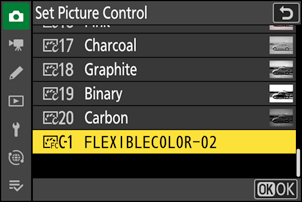
New Picture Control Option: “Flexible Color”
The camera now supports “Flexible Color” Picture Controls. Adjust “
Adding Flexible Color Picture Controls to the Camera
You can export adjusted Flexible Color Picture Controls from NX Studio to memory cards and import them to the camera as Custom Picture Controls.
- Select [Picture Control] > [Flexible Color] in NX Studio to make adjustments and save them as Custom Picture Controls on memory cards. For details on making adjustments and exporting to memory cards, see the NX Studio online help.
Picture Controls exported to memory cards will be added to the Picture Control list when imported to the camera via [Manage Picture Control] in the photo shooting or video recording menu.
- Custom Picture Controls based on [Flexible Color] cannot be adjusted or renamed on the camera.