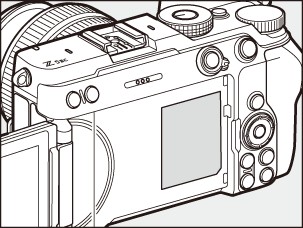
Camera Body
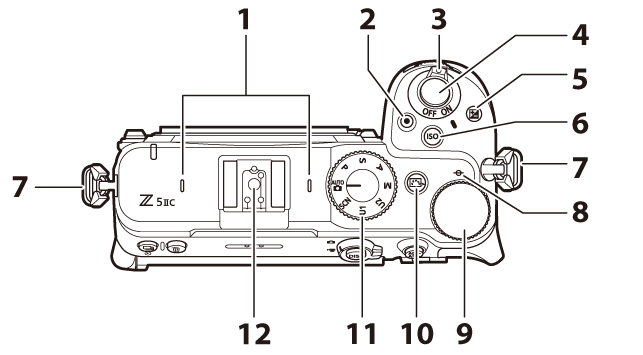
- Stereo microphone (0Recording Videos (b Mode))
- Video-record button (0Recording Videos (b Mode))
- Power switch (0Camera Setup)
- Shutter-release button (0Taking Photographs (b Mode))
- Exposure compensation button (E; 0Exposure Compensation)
ISO sensitivity button (S; 0ISO Sensitivity)
- Eyelet for strap (0Attaching the Strap)
- Focal plane mark (E; 0The Focal Plane Mark and Flange-Back Distance)
- Main command dial
- Picture Control button (h; 0The h (Picture Control) Button)
- Mode dial (0Choosing a Shooting Mode)
- Accessory shoe (for optional flash unit; 0Using an On-Camera Flash, Compatible Flash Units)
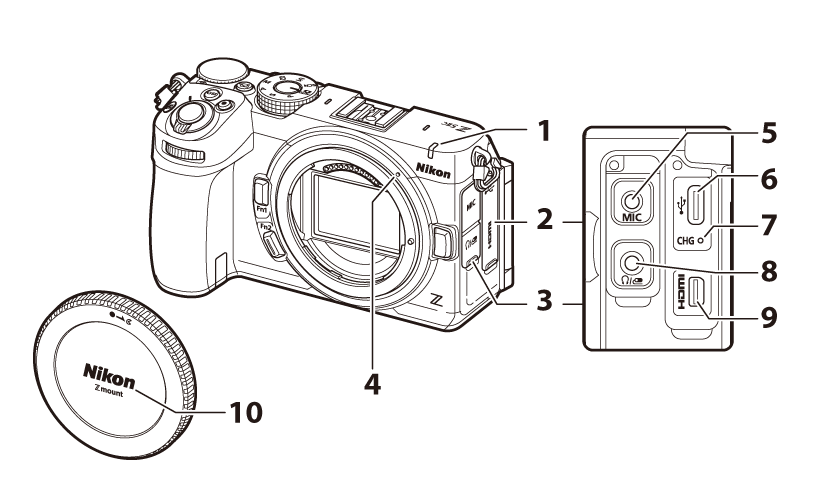
REC lamp (0The REC Lamp, REC lamp brightness)
Self-timer lamp (0Self-Timer Photography, Video Self-Timer)
- Cover for USB and HDMI connectors
- Cover for microphone and headphone/remote cord connectors
- Lens mounting mark (0Attaching a Lens)
- External microphone connector (0Microphones)
- USB connector (0Computers: Connecting via USB, USB power delivery)
- Charge lamp (0Charging the Battery)
- Headphone/remote cord connector (0Headphone volume, Z Connector Function (Headphone/Remote Cord Connector Function))
- HDMI connector (0Connecting to HDMI Devices)
- Body cap (0Attaching a Lens)
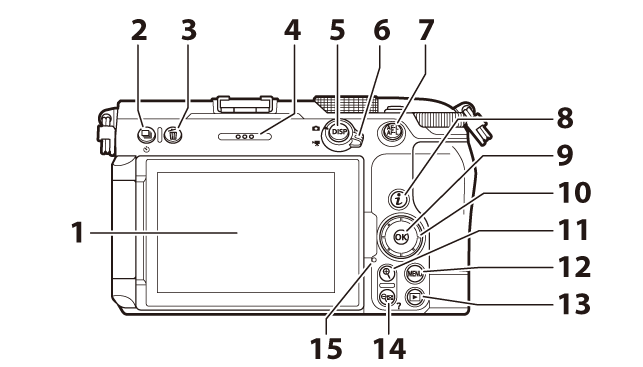
- Monitor (0Touch Controls, The Touch Shutter)
Release mode button (c; 0Release Mode)
Self-timer button (E; 0Self-Timer Photography, Video Self-Timer)
Delete button (O; 0Deleting Unwanted Pictures, Deleting Pictures)
- Speaker
- DISP button (d; 0Choosing a Display)
- Photo/video selector (0Taking Photographs (b Mode), Recording Videos (b Mode))
AE-L/AF-L button (A; 0Focus Lock, Autoexposure (AE) Lock)
Protect button (0Protecting Pictures from Deletion)
- “i” button (i; 0The i Button (i Menu), The Photo Playback i Menu, The Video Playback i Menu)
- OK button (J; 0Using the Menus)
- Multi selector (0Using the Menus)
- Playback zoom in button (X; 0Manual Focus, Thumbnail Playback, Playback Zoom)
- MENU button (G; 0The MENU Button)
- Playback button (K; 0Playback, Viewing Pictures)
Playback zoom out/thumbnails button (W; 0Thumbnail Playback, Using Playback Zoom)
Help button (Q; 0The d (Help) Icon)
- Memory card access lamp (0The Memory Card Access Lamp, The Memory Card Access Lamp)
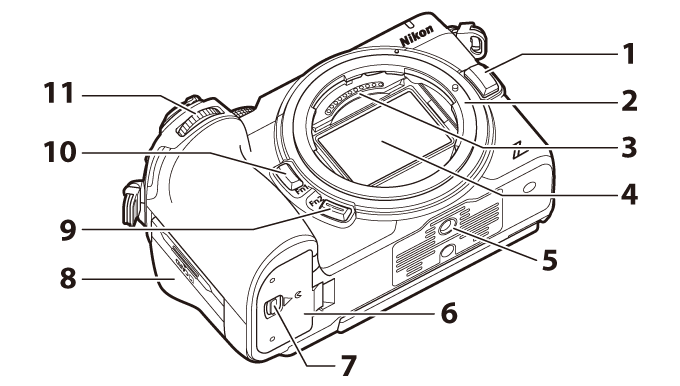
- Lens release button (0Detaching Lenses)
- Lens mount (0Attaching a Lens, The Focal Plane Mark and Flange-Back Distance)
- CPU contacts
- Image sensor (0Manual Image Sensor Cleaning)
- Tripod socket
- Battery chamber cover
- Battery chamber cover latch
- Memory card slot cover (0Inserting Memory Cards)
- Fn2 button (k; 0The Fn1 and Fn2 Buttons)
- Fn1 button (j; 0The Fn1 and Fn2 Buttons)
- Sub-command dial
Under no circumstances should you exert pressure on the image sensor, poke it with cleaning tools, or subject it to powerful air currents from a blower. Failure to observe this precaution could scratch or otherwise damage the sensor. For information on cleaning the image sensor, see “Manual Image Sensor Cleaning” (0Manual Image Sensor Cleaning).