
The Fn1 and Fn2 Buttons
Use the
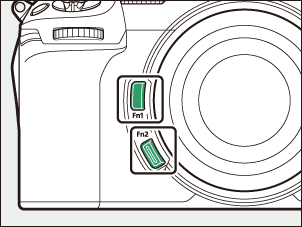
- The default setting for the Fn1 button is white balance (0White Balance) and the Fn2 button is focus mode/AF-area mode (0Focus).
- The assigned setting can be adjusted by holding the Fn1 or Fn2 button and rotating the command dials. In some cases, adjustments are made using both the main and sub-command dials.
- The roles played by these and other controls can be chosen in the Custom Settings menu. Controls can be assigned a variety of different roles for still photography (0f2: Custom controls (shooting)), video recording (0g2: Custom controls), and playback (0f3: Custom controls (playback)).