
Number of Exposures Remaining
- The shooting display shows the number of photographs that can be taken on the memory card at current settings.
- Values over 1000 are rounded down to the nearest hundred. For example, values between 1500 and 1599 are shown as 1.5 k.
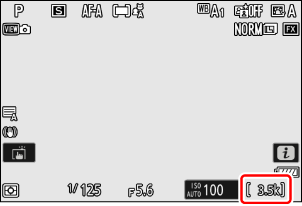
- If no memory card is inserted, an [–E–] indicator will be displayed.
- While the shutter-release button is pressed halfway, the frame-count display will show the number of pictures that can be stored in the memory buffer as “rXXX” (0The Memory Buffer).
SD memory cards are equipped with a write-protect switch. Sliding the switch to the “lock” position write-protects the card, protecting the data it contains.
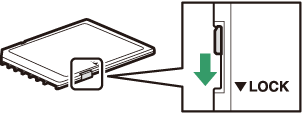
- A “– – –” indicator and a [Card] warning appear in the shooting display when a write-protected card is inserted.
- If you attempt to release the shutter while a write-protected card is inserted, a warning will be displayed and no picture will be recorded. Unlock the memory card before attempting to take or delete pictures.