
The Monitor (Video Mode)
The shooting display in video mode shows the current settings. Other icons or warnings may occasionally be displayed, for example when settings are changed.
- For icons and warnings that are also displayed in photo mode, see "The Monitor (Photo Mode)" (0The Monitor (Photo Mode)).
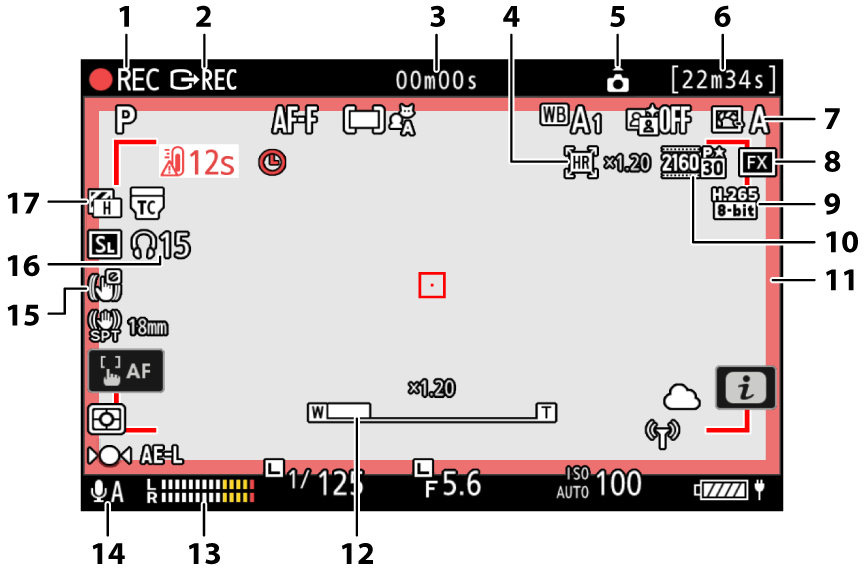
Recording indicator
“No video” indicator (0The 0 Icon)
External recording control (0Recorders)
Length of footage recorded
Timecode (0Timecode)
Hi-Res Zoom indicator (0Hi-Res Zoom)
Zoom ratio for Hi-Res Zoom (0Hi-Res Zoom)
Camera orientation information (0Record camera orientation)
Available recording time
Picture Control (0Picture Controls)
Tone mode (0Tone Mode)
- Image area (0Video Image Area Options)
- Video file type (0Video File Types)
- Frame size and rate (0Video Frame Size and Rate Options)
- Recording indicator (red border; 0g18: Red REC frame indicator)
- Zoom position for Hi-Res Zoom (0Hi-Res Zoom)
- Sound level (0Microphone sensitivity)
- Microphone sensitivity (0Microphone sensitivity)
- Electronic VR indicator (0Electronic VR)
- Headphone volume (0Headphone volume)
- Zebra pattern (0g12: Zebra pattern)