
The Network Menu
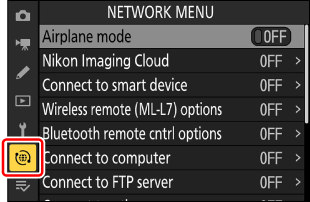
To view the network menu, select the F tab in the camera menus.
Compatible Services and Devices
The network menu introduces menu items for connecting to the following services and devices:
- Nikon Imaging Cloud,
- smart devices,
- ML‑L7 remote controls,
- third-party Bluetooth remote controls,
- computers,
- FTP servers,
- other cameras, and
- Atomos UltraSync BLUE AirGlu accessories.
- The camera can connect to only one type of device at a time and cannot connect to multiple different devices simultaneously. For example, attempting to connect to a smart device while connected to a computer displays a message to end the connection. Highlight [Yes] and press J to end the connection to the computer and make the connection to the smart device available.
The network menu contains the following items:
- [Airplane mode] (0Airplane mode)
- [Nikon Imaging Cloud] (0Nikon Imaging Cloud)
- [Connect to smart device] (0Connect to smart device)
- [Wireless remote (ML-L7) options] (0Wireless remote (ML-L7) options)
- [Bluetooth remote cntrl options] (0Bluetooth remote cntrl options)
- [Connect to computer] (0Connect to computer)
- [Connect to FTP server] (0Connect to FTP server)
- [Connect to other cameras] (0Connect to other cameras)
- [ATOMOS AirGlu BT options] (0ATOMOS AirGlu BT options)
- [USB] (0USB)
- [Router frequency band] (0Router frequency band)
- [MAC address] (0MAC address)