
Bluetooth remote cntrl options
G button U F network menu
Connect to third-party Bluetooth remote controls.
- Bluetooth remote controls must be paired with the camera before use.
- The camera can be paired with only one Bluetooth remote control at a time. It will respond only to the remote control with which it was last paired.
- The following Bluetooth remote control has been tested and approved for use:
- SmallRig SR-RG2 Wireless Shooting Grip
- In addition to the present document, you will also need to consult the documentation for the Bluetooth remote control.
Bluetooth remote cntrl connection
| Option | Description |
|---|---|
| [ON] | Connect to the Bluetooth remote control with which the camera has most recently been paired. |
| [OFF] | End an existing connection to a Bluetooth remote control. |
Save wireless remote controller
The Bluetooth remote control must be paired with the camera before use.
-
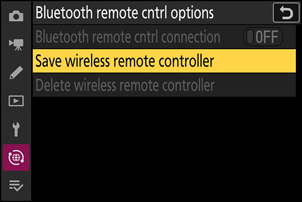
Select [Bluetooth remote cntrl options] > [Save wireless remote controller] in the camera network menu and press J.
The camera will enter pairing mode.
-
Pair with the Bluetooth remote control.
-
The camera and Bluetooth remote control will begin pairing.
-
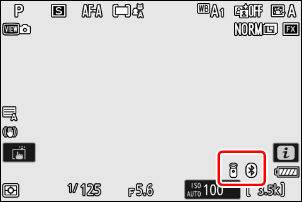
When pairing is complete, the Bluetooth remote control will be added to the camera and will establish a connection.
- W and Z will appear in the shooting display.
-
Delete wireless remote controller
End pairing between the camera and the Bluetooth remote control.