
The Monitor (Photo Mode)
The shooting display in photo mode shows the current settings. Other icons or warnings may occasionally be displayed, for example when settings are changed.
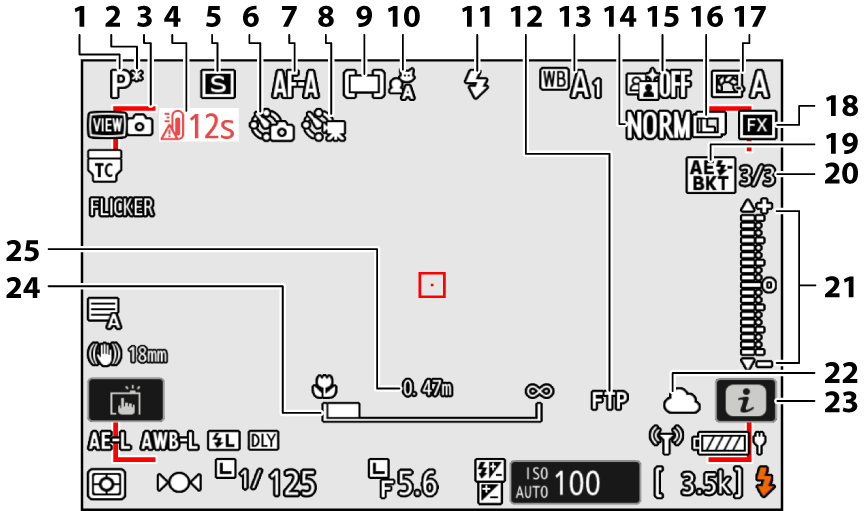
- Shooting mode (0Choosing a Shooting Mode)
- Flexible program indicator (0P (Programmed Auto))
- Out-of-focus indicator (auto-area AF; 0Taking Photographs (b Mode))
- Temperature warning (0Auto temperature cutout)
- Release mode (0Release Mode)
Interval-timer photography indicator (0Interval timer shooting)
g icon (0The g Icon)
“No memory card” indicator (0Number of Exposures Remaining, No Memory Card Inserted)
- Focus mode (0Focus Mode)
- Time-lapse video indicator (0Time-lapse video)
- AF-area mode (0 AF-Area Mode)
- Subject detection (0Subject Detection)
- Flash mode (0Flash Modes)
- FTP connection status (0FTP Servers: Connecting via Wireless LAN)
- White balance (0White Balance)
- Image quality (0Adjusting Image Quality)
- Active D-Lighting (0Active D-Lighting)
- Image size (0Choosing an Image Size)
- Picture Control (0Set Picture Control)
- Image area (0Adjusting Image Area Settings)
Exposure and flash bracketing indicator (0Exposure and Flash Bracketing)
WB bracketing indicator (0White Balance Bracketing)
ADL bracketing indicator (0ADL Bracketing)
HDR indicator (0Taking HDR Photographs)
Multiple exposure indicator (0Creating a Multiple Exposure)
Pixel shift indicator (0Pixel shift shooting)
Number of shots in exposure and flash bracketing sequence (0Exposure and Flash Bracketing)
Number of shots in WB bracketing sequence (0White Balance Bracketing)
Number of shots in ADL bracketing sequence (0ADL Bracketing)
HDR strength (0Taking HDR Photographs)
Number of shots in multiple exposure (0Creating a Multiple Exposure)
Pre-Release Capture (0d3: Pre-Release Capture options)
Number of shots in pixel shift sequence (0Pixel shift shooting)
Exposure indicator
- Exposure (0Exposure Indicator)
- Exposure compensation (0Exposure Compensation)
- Auto bracketing (0Auto bracketing)
Nikon Imaging Cloud connection status (0Connecting the Camera to Nikon Imaging Cloud)
Remote camera connection status (0Synchronized Release)
- i icon (0The i Button (i Menu))
- Focus distance indicator (0Manual Focus)
- Distance between the camera and the focus position (0Manual Focus)
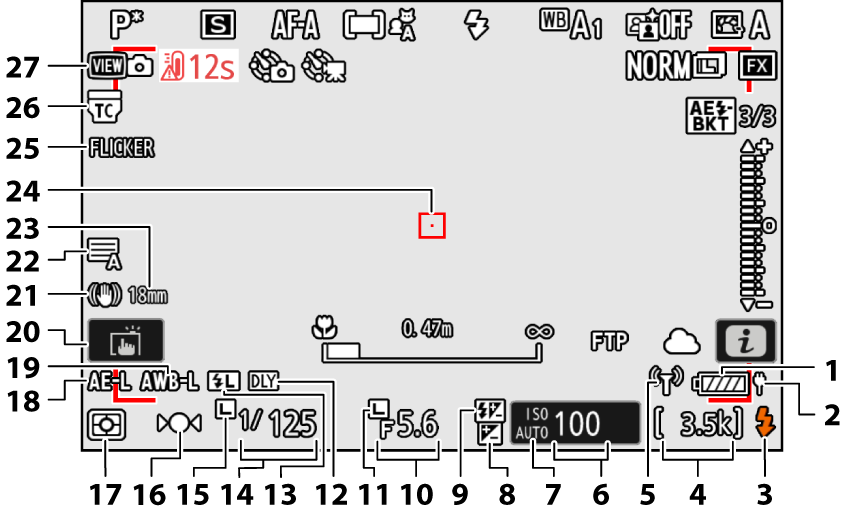
- Battery indicator (0Battery Level)
- USB power delivery (0USB power delivery)
- Flash-ready indicator (0Using an On-Camera Flash)
Number of exposures remaining (0Number of Exposures Remaining, Memory Card Capacity)
Buffer capacity (0The Memory Buffer)
Camera control mode display (0Using NX Tether to Control the USB-Connected Camera, Using NX Tether to Control the Wi-Fi-Connected Camera)
Wi-Fi connection indicator (0Smart Devices: Connecting via Wi-Fi, Direct Wireless Connection to a Computer (Wi-Fi Access Point Mode), Direct Wireless Connection to an FTP Server (Wi-Fi Access Point Mode))
Bluetooth connection indicator (0Pairing (Bluetooth))
Airplane mode (0Airplane mode)
- ISO sensitivity (0ISO Sensitivity)
ISO sensitivity indicator (0ISO Sensitivity)
Auto ISO sensitivity indicator (0Auto ISO Sensitivity Control)
- Exposure compensation indicator (0Exposure Compensation)
- Flash compensation indicator (0Flash Compensation)
- Aperture (0A (Aperture-Priority Auto), M (Manual))
- Aperture lock icon (0f4: Control lock)
- Exposure delay mode indicator (0d5: Exposure delay mode)
- FV lock indicator (0FV Lock)
- Shutter speed (0S (Shutter-Priority Auto), M (Manual))
- Shutter speed lock icon (0f4: Control lock)
- Focus indicator (0Manual Focus)
- Metering (0Metering)
- Autoexposure (AE) lock (0Autoexposure (AE) Lock)
- Auto white-balance (AWB) lock (0f2: Custom controls (shooting))
Touch shooting (0Touch Controls, The Touch Shutter)
- Vibration reduction indicator (0Vibration reduction)
Shutter type (0d6: Shutter type)
Silent mode (0Silent mode)
- Focal length 1
- Focus point (0Focus-Point Selection)
- FLICKER icon (0Photo flicker reduction)
- “Lens built-in teleconverter enabled” indicator 2
- View mode (0d10: View mode (photo Lv))
Displayed when using a zoom lens with no focal length scale.
Display only when a NIKKOR Z lens with a built-in teleconverter is attached and the teleconverter enabled.
- If the camera temperature becomes elevated, a high-temperature warning (K) and count-down timer will be displayed. When the timer reaches zero, the shooting display will turn off.
- The temperature at which the count-down timer starts can be selected from [Standard] and [High] using [Auto temperature cutout] in the setup menu.
- The timer turns red when the 30-second mark is reached. In some cases, the timer may be displayed immediately after the camera is turned on.
If the camera becomes hot, a high-temperature warning (K) may appear in the shooting display. Note that the camera body and battery may be hot while the high-temperature warning (K) is displayed.
When the Wi-Fi Connection Indicator Flashes Rapidly
When the camera becomes hot while wirelessly connecting to a computer or smart device, the Wi-Fi connection indicator (U) flashes rapidly and wireless transmission is interrupted.
- Wait for the camera to cool before reconnecting the camera to the computer or smart device.
- When the Wi-Fi connection indicator (U) flashes rapidly, note that the camera body and battery may be hot.
If no memory card is inserted, [–E–] and a “no memory card” indicator will appear in the shooting display.
The Information Display
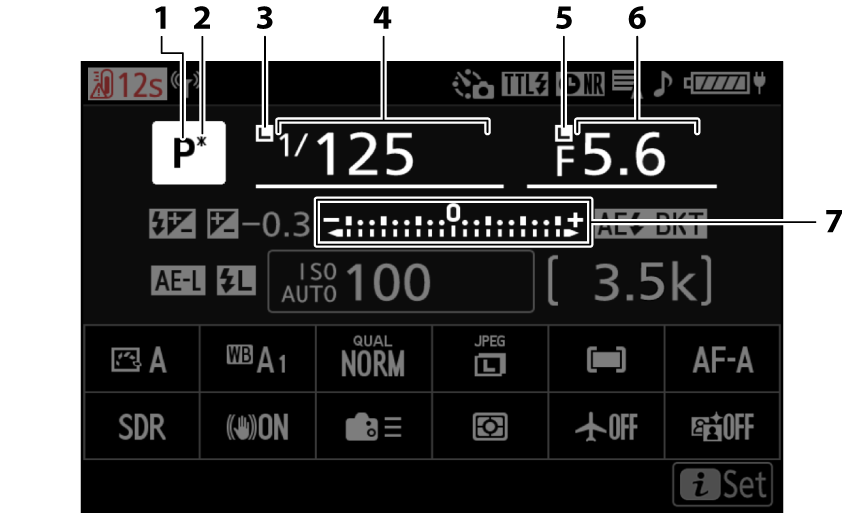
- Shooting mode (0Choosing a Shooting Mode)
- Flexible program indicator (0P (Programmed Auto))
- Shutter speed lock icon (0f4: Control lock)
- Shutter speed (0S (Shutter-Priority Auto), M (Manual))
- Aperture lock icon (0f4: Control lock)
- Aperture (0A (Aperture-Priority Auto), M (Manual))
Exposure indicator
- Exposure (0Exposure Indicator)
- Exposure compensation (0Exposure Compensation)
- Auto bracketing (0Auto bracketing)
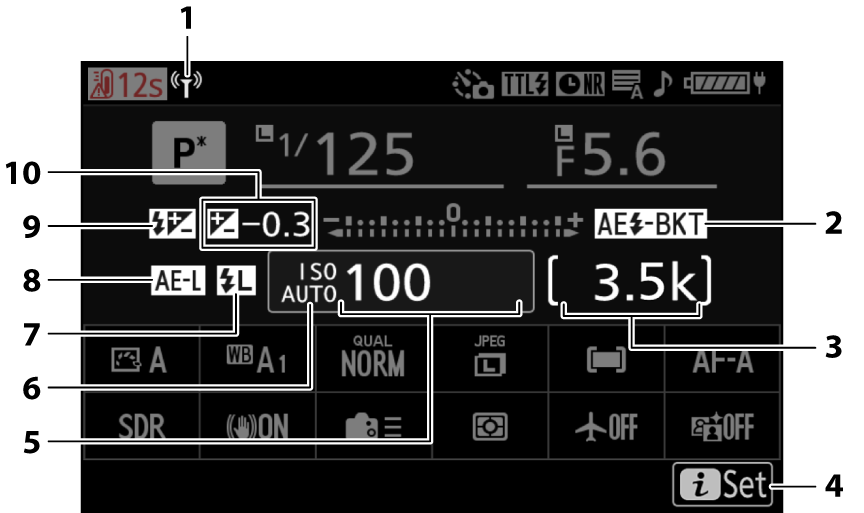
Wi-Fi connection indicator (0Smart Devices: Connecting via Wi-Fi, Direct Wireless Connection to a Computer (Wi-Fi Access Point Mode), Direct Wireless Connection to an FTP Server (Wi-Fi Access Point Mode))
Bluetooth connection indicator (0Pairing (Bluetooth))
Exposure and flash bracketing indicator (0Exposure and Flash Bracketing)
WB bracketing indicator (0White Balance Bracketing)
ADL bracketing indicator (0ADL Bracketing)
HDR indicator (0Taking HDR Photographs)
Multiple exposure indicator (0Creating a Multiple Exposure)
Pixel shift indicator (0Pixel shift shooting)
Number of exposures remaining (0Number of Exposures Remaining, Memory Card Capacity)
Buffer capacity (0The Memory Buffer)
Camera control mode display (0Using NX Tether to Control the USB-Connected Camera, Using NX Tether to Control the Wi-Fi-Connected Camera)
- i icon (0The i Button (i Menu))
- ISO sensitivity (0ISO Sensitivity)
ISO sensitivity indicator (0ISO Sensitivity)
Auto ISO sensitivity indicator (0Auto ISO Sensitivity Control)
- FV lock indicator (0FV Lock)
- Autoexposure (AE) lock (0Autoexposure (AE) Lock)
- Flash compensation indicator (0Flash Compensation)
Exposure compensation indicator (0Exposure Compensation)
Exposure compensation value (0Exposure Compensation)
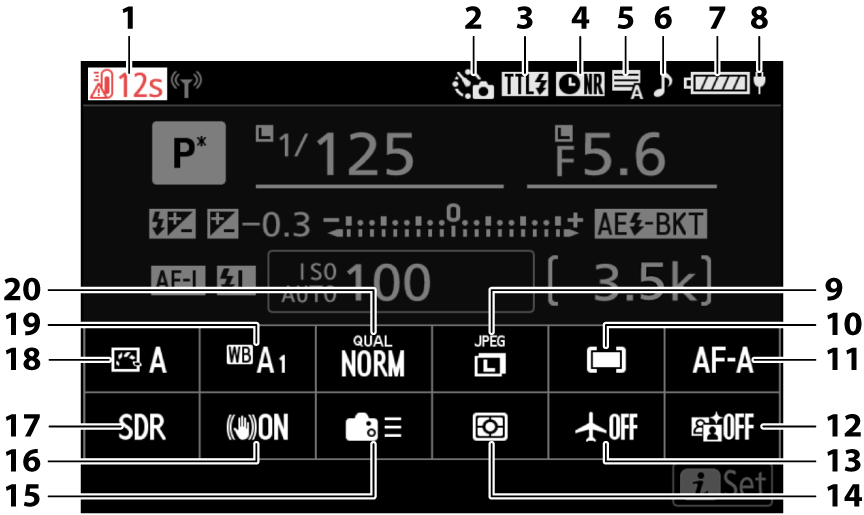
- Temperature warning (0Auto temperature cutout)
Interval-timer photography indicator (0Interval timer shooting)
Time-lapse video indicator (0Time-lapse video)
g icon (0The g Icon)
- Flash control mode (0Flash Control Mode)
- Long-exposure noise reduction indicator (0Long exposure NR)
- Shutter type (0d6: Shutter type)
- “Beep” indicator (0Camera sounds)
- Battery indicator (0Battery Level)
- USB power delivery (0USB power delivery)
- Image size (0Choosing an Image Size)
- AF-area mode/subj. detection (0AF-Area Mode, Subject Detection)
- Focus mode (0Focus Mode)
- Active D-Lighting (0Active D-Lighting)
- Airplane mode (0Airplane mode)
- Metering (0Metering)
- Custom controls (shooting; 0f2: Custom controls (shooting))
- Vibration reduction (0Vibration reduction)
- Tone mode (0Tone mode)
- Set Picture Control (0Picture Controls)
- White balance (0White Balance)
- Image quality (0Adjusting Image Quality)