
The Photo Shooting Menu
To view the photo shooting menu, select the C tab in the camera menus.
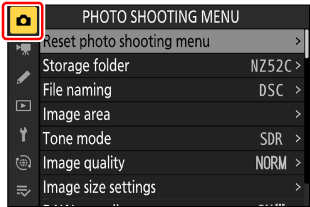
The photo shooting menu contains the following items:
- [Reset photo shooting menu] (0Reset photo shooting menu)
- [Storage folder] (0Storage folder)
- [File naming] (0File naming)
- [Image area] (0Image area)
- [Tone mode] (0Tone mode)
- [Image quality] (0Image quality)
- [Image size settings] (0Image size settings)
- [RAW recording] (0RAW recording)
- [ISO sensitivity settings] (0ISO sensitivity settings)
- [White balance] (0White balance)
- [Set Picture Control] (0Set Picture Control)
- [Manage Picture Control] (0Manage Picture Control)
- [Set Picture Control (HLG)] (0Set Picture Control (HLG))
- [Color space] (0Color space)
- [Active D-Lighting] (0Active D-Lighting)
- [Long exposure NR] (0Long exposure NR)
- [High ISO NR] (0High ISO NR)
- [Vignette control] (0Vignette control)
- [Diffraction compensation] (0Diffraction compensation)
- [Auto distortion control] (0Auto distortion control)
- [Skin softening] (0Skin softening)
- [Portrait impression balance] (0Portrait impression balance)
- [Film grain options] (0Film grain options)
- [Photo flicker reduction] (0Photo flicker reduction)
- [High-frequency flicker reduction] (0High-frequency flicker reduction)
- [Metering] (0Metering)
- [Flash control] (0Flash control)
- [Flash mode] (0Flash mode)
- [Flash compensation] (0Flash compensation)
- [Release mode] (0Release mode)
- [Focus mode] (0Focus mode)
- [AF-area mode] (0AF-area mode)
- [AF/MF subject detection options] (0AF/MF subject detection options)
- [MF subject detection area] (0MF subject detection area)
- [Vibration reduction] (0Vibration reduction)
- [Link VR to focus point] (0Link VR to focus point)
- [Auto bracketing] (0Auto bracketing)
- [Multiple exposure] (0Multiple exposure)
- [HDR overlay] (0HDR overlay)
- [Interval timer shooting] (0Interval timer shooting)
- [Time-lapse video] (0Time-lapse video)
- [Focus shift shooting] (0Focus shift shooting)
- [Pixel shift shooting] (0Pixel shift shooting)