
My Menu: Removing Items
G button U O my menu
You can delete items from My Menu.
Select [Remove items] in [O MY MENU].
Highlight [Remove items] and press 2.
Select items.
- Highlight items and press J or 2 to select (M) or deselect.
- Continue until all the items you wish to remove are selected (L).
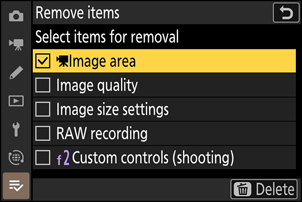
Remove the selected items.
Press O; a confirmation dialog will be displayed. Press J to remove the selected items.
Removing Items While in My Menu
Items can also be removed by highlighting them in [O MY MENU] and pressing the O button; a confirmation dialog will be displayed. Press O again to remove the selected item.