
Self-Portraits
Rotating the monitor to the self-portrait position triggers self-portrait mode.
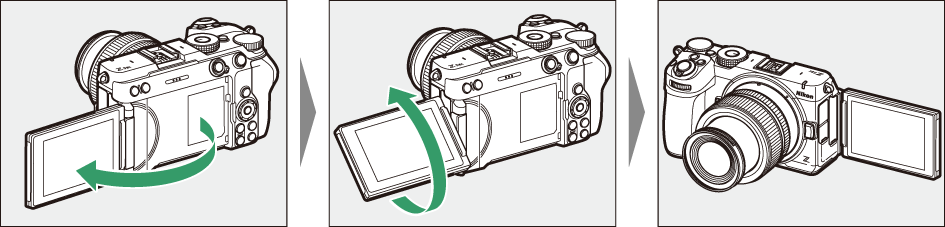
- The monitor shows a mirror image of the view through the lens, but pictures recorded by the camera are not mirrored.
- In photo mode, tap the
self-timer icon (q) in the monitor to set the self-timer delay and select the number of shots to be taken when the timer expires. In video mode, set the self-timer delay for video recording. - You can also adjust exposure by tapping the exposure compensation icon (w).
- In video mode, enable the
product review mode (0Product Review Mode) by tapping the product review mode icon (e). Use this mode to focus on nearby subjects when shooting product review videos. Tap the icon to cycle through options.
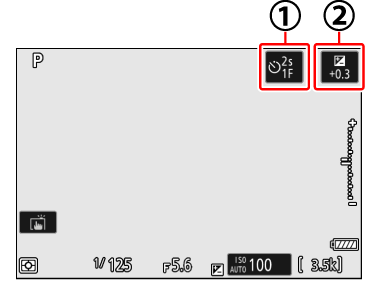
Photo mode
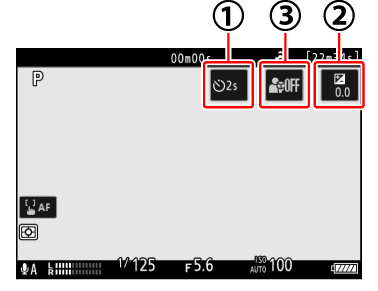
Video mode
- Press the shutter-release button halfway to focus. Press it the rest of the way down to take a photograph.
- You can also use the monitor for touch AF and take pictures via the touch shutter.
If the self-timer is enabled, press the shutter-release button all the way down or tap the monitor.
- The monitor will display a countdown timer and the shutter will release when it reaches zero.
- The camera will focus about a second before releasing the shutter (0The Focus Position in Self-Timer).
- Pressing the video-record button will take a photograph in photo mode. In video mode, the camera starts recording video.
- Self-portrait mode ends when the monitor is moved to another position.
Note the following points when using the camera in self-portrait mode:
- Self-portrait mode disables all controls other than the power switch, the shutter-release and video-record buttons, the photo/video selector, and the mode dial.
- The standby timer will expire if no operations are performed for either one minute or the time selected for Custom Setting c3 [Power off delay] > [Standby timer], whichever is longer.
The following settings are fixed at the values below.
- [Release mode]: [Self-timer]
- [Focus mode] in the video recording menu: [Full-time AF]
- [Touch controls]: [Enable]
The following features are disabled:
- [Long exposure NR]
- [Auto bracketing]
- [HDR overlay]
- [Exposure delay mode]
- You cannot change the dimensions of the focus areas when [Product review mode] is set to [On (customize focus area)] in self-portrait mode.
- Rotating the monitor to the self-portrait position will not trigger self-portrait mode when [OFF] is selected for [Self-portrait mode] in the setup menu (0Self-portrait mode).