
Caring for the Camera
Long-Term Storage
Remove the battery if the product will not be used for an extended period. Before removing the battery, confirm that the camera is off.
Do not store the camera in locations that:
- are poorly ventilated or subject to humidities of over 60%,
- are next to equipment that produces strong electromagnetic fields, such as televisions or radios, or
- are exposed to temperatures above 50 °C (122 °F) or below −10 °C (14 °F).
Cleaning
The procedure varies with the part that requires cleaning. The procedures are detailed below.
- Do not use alcohol, thinner, or other volatile chemicals.
Camera Body
Use a blower to remove dust and lint, then wipe gently with a soft, dry cloth. After using the camera at the beach or seaside, wipe off sand or salt with a cloth lightly dampened in distilled water and dry the camera thoroughly.
Important: The following cases are not covered under our warranty.
- Damage due to the presence of foreign matter inside the camera.
- Damage caused by using a spray-type blower too close to the camera.
Lens
Lenses are easily damaged: remove dust and lint with a blower. If using an aerosol blower, keep the can vertical to prevent the discharge of liquid that could damage glass elements. To remove fingerprints and other stains, apply a small amount of lens cleaner to a soft cloth and clean with care.
The Monitor
Remove dust and lint with a blower. When removing smudges, fingerprints, and other oily stains, wipe the surface lightly with a soft cloth or chamois leather. Do not apply pressure, as this could result in damage or malfunction.
Manual Image Sensor Cleaning
Dirt or dust entering the camera when lenses are exchanged or the body cap is removed may adhere to the image sensor and affect your photographs. The image sensor can be cleaned manually as described below. Note that the sensor is extremely delicate and easily damaged; we recommend that manual cleaning be performed only by a Nikon-authorized service representative.
To prevent loss of power during cleaning, use a fully-charged battery, optional AC adapter, or optional power connector with an AC adapter.
Highlight [Sensor maintenance] in the setup menu and press 2.
Press J.
The image sensor position will be locked.
Remove the lens.
Holding the camera so that light can enter, examine the image sensor for dust or lint.
If no foreign objects are present, proceed to Step 6.
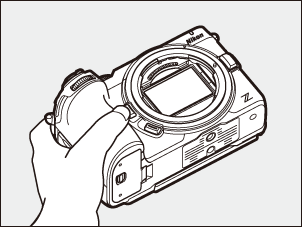
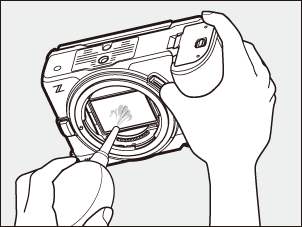
Remove any dust and lint from the sensor with a blower.
- Do not use a blower-brush. The bristles could damage the sensor.
- Dirt that cannot be removed with a blower can only be removed by Nikon-authorized service personnel. Under no circumstances should you touch or wipe the sensor.
Replace the lens or supplied body cap.
Turn the camera off to end sensor maintenance.
Foreign Matter on the Image Sensor
Foreign matter entering the camera when lenses or body caps are removed or exchanged (or in rare circumstances lubricant or fine particles from the camera itself) may adhere to the image sensor, where it may appear in photographs taken under certain conditions. To prevent entry of foreign matter when attaching the body cap or exchanging lenses, avoid dusty environments and be sure to remove all dust and other foreign matter that may be adhering to the camera mount, lens mount, or body cap. To protect the camera when no lens is in place, be sure to replace the supplied body cap. If foreign matter adheres on the image sensor, clean the sensor as described in “Manual Image Sensor Cleaning” (0Manual Image Sensor Cleaning), or have the sensor cleaned by Nikon-authorized service personnel. Photographs affected by the presence of foreign matter on the sensor can be retouched using the clean image options available in some imaging applications.
Servicing the Camera and Accessories
The camera is a precision device and requires regular servicing; Nikon recommends that the camera be inspected once every one to two years, and that it be serviced once every three to five years (note that fees apply to these services).
- Frequent inspection and servicing are particularly recommended if the camera is used professionally.
- Any accessories regularly used with the camera, such as lenses or optional flash units, should be included when the camera is inspected or serviced.