
The Photo Playback i Menu
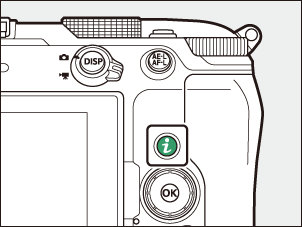
Pressing the i button while a photo is selected for playback in full frame, thumbnail, or playback zoom displays the i menu for photo playback. Highlight items and press J or 2 to select.
Press the i button again to return to playback.
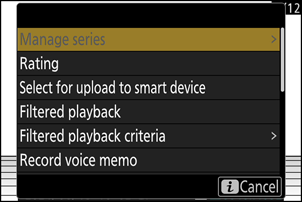
| Option | Description |
|---|---|
| [Quick crop] 1 | Save a copy of the current picture cropped to the area visible in the display. This option is not available when RGB histograms are displayed (0Photo Information (RGB Histogram)). |
| [Manage series] | If [ON] is selected for [Series playback] > [List series as single thumbnails] in the playback menu, you can use this option to delete, protect, or mark for upload the current picture and all other pictures in the same burst.
|
| [Rating] | Rate the current picture (0Rating Pictures). |
| [Select for upload to The Cloud] | Select the current picture for upload (0Selecting Pictures for Upload).
|
| [Select for upload to smart device] | |
| [Select for upload to computer] | |
| [Select for upload (FTP)] | |
| [Select for priority upload to computer] | Select the current picture for priority upload (0Selecting Pictures for Upload). Pictures marked for priority upload will be uploaded before other pictures marked for upload.
|
| [Select for priority upload (FTP)] | |
| [Select all for upload to The Cloud] | Mark for upload all pictures meeting the current filter criteria (0Filtered Playback).
|
| [Select all for computer upload] | |
| [Select all for upload (FTP)] | |
| [Filtered playback] | View only pictures that match selected criteria (0Filtered Playback). |
| [Filtered playback criteria] | Choose filter criteria. |
| [Record voice memo] | Add a voice memo to the current picture (0Recording/Playing Voice Memos). |
| [Play voice memo] | Play the voice memo for the current picture (0Recording/Playing Voice Memos). |
| [Retouch] | Create a retouched copy of the current picture (0Retouching Photographs). |
| [Choose folder] | Choose a folder for playback. Highlight a folder and press J to view the pictures it contains. |
| [Protect] | Add protection to or remove protection from the current picture (0Protecting Pictures from Deletion). |
| [Unprotect all] 2 | Remove protection from all pictures in the folder currently selected for [Playback folder] in the playback menu. |
| [IPTC] | Embed a selected IPTC preset in the current photo (0IPTC). |
| [Side-by-side comparison] 3 | Compare retouched copies to the originals. |
| [Slide show] | View a slide show; the current picture and all following pictures are displayed one at a time in the order recorded (0Viewing Slide Shows). |
Available only during playback zoom.
Not available during playback zoom.
Available only when a retouched copy (indicated by a p icon) or the source picture for a retouched copy is selected.
Choose [Side-by-side comparison] to compare retouched copies with the unretouched originals.
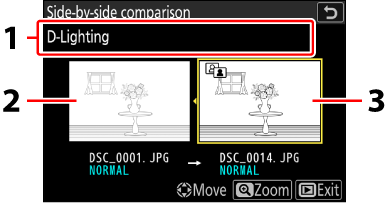
- Options used to create copy
- Source picture
- Retouched copy
- The source picture is displayed on the left, the retouched copy on the right.
- The option used to create the copy is listed at the top of the display.
- Press 4 or 2 to switch between the source picture and the retouched copy.
- If the copy is an overlay created from multiple source pictures, press 1 or 3 to view the other pictures.
- If the source has been copied multiple times, press 1 or 3 to view the other copies.
- To view the highlighted picture full screen, press and hold the X button.
- Press J to return to playback with the highlighted picture displayed full frame.
- To exit to playback, press the K button.
- The source picture will not be displayed if the copy was created from a protected photograph.
- The source picture will not be displayed if the copy was created from a photograph that has since been deleted.