
Long Time-Exposures
"Long time-exposure" allows the shutter to remain open for a desired time in mode M. The camera offers two options for long time-exposures: “
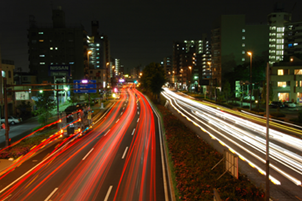
A 35-second exposure shot at a shutter speed of “Bulb” and an aperture of f/25
| Shutter speed | Description |
|---|---|
| Bulb | The shutter remains open while the shutter-release button is held down. |
| Time | The exposure starts when the shutter-release button is pressed and ends when the button is pressed a second time. |
Keep the camera steady, for example by using a tripod.
Rotate the mode dial to M.
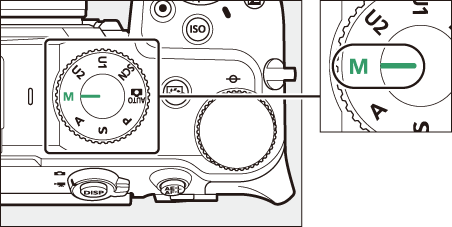
Rotate the main command dial to choose a shutter speed of Bulb (“Bulb”) or Time (“Time”).
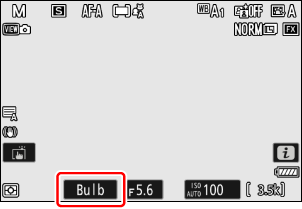
Bulb
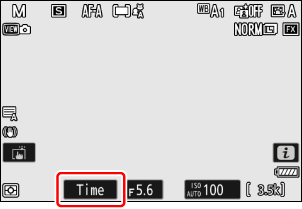
Time
Note that the exposure indicator is not displayed at a shutter speed of Bulb or Time.
Focus and start the exposure.
- “Bulb”: Press the shutter-release button all the way down to start the exposure. Keep the shutter-release button pressed during the exposure.
- “Time”: Press the shutter-release button all the way down to start the exposure.
End the exposure.
- “Bulb”: Lift your finger from the shutter-release button.
- “Time”: Press the shutter-release button all the way down a second time.
- Note that “noise” (bright spots, randomly-spaced bright pixels or fog) may be present in long exposures.
- Bright spots and fog can be reduced by choosing [ON] for [Long exposure NR] in the photo shooting menu.
We recommend using one of the following power sources to prevent loss of power during long exposures:
- A fully-charged battery
- An optional EH-8P AC adapter connected using the supplied USB cable (featuring Type-C connectors at both ends)
- An optional EP‑5B power connector with an EH‑5d, EH‑5c, or EH‑5b AC adapter
- A third-party portable charger (power bank)
- To prevent blur, use of a tripod or a device such as an optional remote cord is recommended.
- Note that optional ML‑L7 remote controls function in “Time” mode even when a shutter speed of Bulb is selected.