
The Video Recording Menu
To view the video recording menu, select the 1 tab in the camera menus.
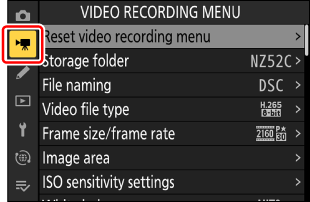
The video recording menu contains the following items:
- [Reset video recording menu] (0Reset video recording menu)
- [Storage folder] (0Storage folder)
- [File naming] (0File naming)
- [Video file type] (0Video file type)
- [Frame size/frame rate] (0Frame size/frame rate)
- [Image area] (0Image area)
- [ISO sensitivity settings] (0ISO sensitivity settings)
- [White balance] (0White balance)
- [Set Picture Control] (0Set Picture Control)
- [Manage Picture Control] (0Manage Picture Control)
- [HLG quality] (0HLG quality)
- [Active D-Lighting] (0Active D-Lighting)
- [High ISO NR] (0High ISO NR)
- [Vignette control] (0Vignette control)
- [Diffraction compensation] (0Diffraction compensation)
- [Auto distortion control] (0Auto distortion control)
- [Breathing compensation] (0Breathing compensation)
- [Skin softening] (0Skin softening)
- [Portrait impression balance] (0Portrait impression balance)
- [Film grain options] (0Film grain options)
- [Video flicker reduction] (0Video flicker reduction)
- [High-frequency flicker reduction] (0High-frequency flicker reduction)
- [Metering] (0Metering)
- [Focus mode] (0Focus mode)
- [AF-area mode] (0AF-area mode)
- [AF/MF subject detection options] (0AF/MF subject detection options)
- [Product review mode] (0Product review mode)
- [MF subject detection area] (0MF subject detection area)
- [Video self-timer] (0Video self-timer)
- [Vibration reduction] (0Vibration reduction)
- [Electronic VR] (0Electronic VR)
- [Microphone sensitivity] (0Microphone sensitivity)
- [Attenuator] (0Attenuator)
- [Frequency response] (0Frequency response)
- [Wind noise reduction] (0Wind noise reduction)
- [Mic jack plug-in power] (0Mic jack plug-in power)
- [Headphone volume] (0Headphone volume)
- [Timecode] (0Timecode)
- [External rec. cntrl (HDMI)] (0External rec. cntrl (HDMI))
- [Hi-Res Zoom] (0Hi-Res Zoom)