
Cautions: Using the Camera
- Do Not Drop
- Do not drop the camera or lens or subject them to blows. The product may malfunction if subjected to strong shocks or vibration.
- Keep Dry
- Keep the camera dry. Rusting of the internal mechanism caused by water inside the camera can not only be expensive to repair but can in fact cause irreparable damage.
- Avoid Sudden Changes in Temperature
- Taking the camera from a warm to a cold environment or vice versa may cause damaging condensation inside and outside the camera. Place the camera in a sealed bag or plastic case before taking it across a temperature boundary. The camera can be taken from the bag or case once it has had time to adjust to the new temperature.
- Keep Away from Strong Magnetic Fields
- Static charges or the magnetic fields produced by equipment such as radio transmitters could interfere with the monitor, corrupt data stored on the memory card, or affect the product’s internal circuitry.
- Keep Credit Cards and Other Such Magnetic Storage Devices Away from the Camera and Lens
- Data stored on magnetic storage devices could be corrupted.
- Do Not Leave the Lens Pointed at the Sun
- Do not leave the lens pointed at the sun or other bright light source. Intense light may damage the image sensor or cause fading or “burn in”. Photographs taken with the camera may exhibit a white blur effect.
- Lasers and Other Bright Light Sources
- Do not direct lasers or other extremely bright light sources toward the lens, as this could damage the camera’s image sensor.
- Turn the Product Off Before Removing or Disconnecting the Power Source
- Removing or disconnecting the power source while the camera is on could damage the product. Particular care should be taken not to remove or disconnect the power source while pictures are being recorded or deleted.
- Cleaning
- When cleaning the camera body, use a blower to gently remove dust and lint, then wipe gently with a soft, dry cloth. After using the camera at the beach or seaside, wipe off any sand or salt using a cloth lightly dampened in fresh water and then dry the camera thoroughly with a dry, soft cloth.
- Cleaning the Lens
- Lenses are easily damaged: remove dust and lint with a blower. If using an aerosol blower, keep the can vertical to prevent the discharge of liquid that could damage glass elements. To remove fingerprints and other stains from the lens, apply a small amount of lens cleaner to a soft cloth and wipe the lens carefully.
- Do Not Touch the Image Sensor
Under no circumstances should you exert pressure on the image sensor, poke it with cleaning tools, or subject it to powerful air currents from a blower. These actions could scratch or otherwise damage the sensor.
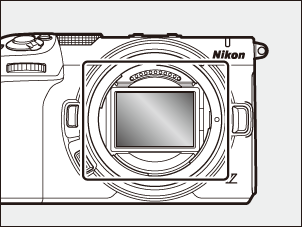
- Cleaning the Image Sensor
- For information on cleaning the image sensor, see “Manual Image Sensor Cleaning” (0Manual Image Sensor Cleaning).
- The Lens Contacts
- Keep the lens contacts clean. Avoid touching them with your fingers.
- Store in a Well-Ventilated Area
- To prevent mold or mildew, store the camera in a dry, well-ventilated area. Do not store the camera with naphtha or camphor moth balls, next to equipment that produces strong electromagnetic fields, or where it will be exposed to extremely high temperatures, for example near a heater or in an enclosed vehicle on a hot day. Failure to observe these precautions could result in product malfunction.
- Long-Term Storage
- To prevent damage caused for example by leaking battery fluid, remove the battery if the product will not be used for an extended period. Store the camera in a plastic bag containing a desiccant. Do not, however, store the leather camera case in a plastic bag, as this may cause the material to deteriorate. Store the battery in a cool, dry place. Note that desiccant gradually loses its capacity to absorb moisture and should be replaced at regular intervals. To prevent mold or mildew, take the camera out of storage at least once a month, insert the battery, and release the shutter a few times.
- Monitor
- The monitor is constructed with extremely high precision; at least 99.99% of pixels are effective, with no more than 0.01% being missing or defective. Hence while the display may contain pixels that are always lit (white, red, blue, or green) or always off (black), this is not a malfunction. Pictures recorded with the device are unaffected. Your understanding is requested.
- Pictures in the monitor may be difficult to see in a bright light.
- Do not apply pressure to the monitor. It could malfunction or suffer damage. Dust or lint can be removed with a blower. Stains can be removed by wiping the monitor lightly with a soft cloth or chamois leather. Should the monitor break, care should be taken to avoid injury from broken glass. Be careful that liquid crystal from the monitor does not touch the skin or enter the eyes or mouth.
- The display may rapidly flicker on and off during burst photography. Watching the flickering display could cause you to feel unwell. Discontinue use until your condition improves.
- Bright Lights and Back-Lit Subjects
- Noise in the form of lines may in rare cases appear in pictures that include bright lights or back-lit subjects.
- Camera Shooting and Playback Displays
- When [HLG] is selected for tone mode, the shooting and playback displays in the camera monitor may include “noise” in the form of randomly-spaced bright pixels, fog, or lines or may fail to accurately reproduce highlights and highly-saturated colors. In addition, abrupt tone discontinuities may be visible in the camera monitor when photos are displayed full-frame, although the photos themselves are unaffected. For accurate tone reproduction, use monitors, computers, operating systems, applications, and other equipment compatible with HLG.