
Photo Information (Shooting Data)
View the settings in effect at the time the picture was taken. The shooting data list has multiple pages, which can be viewed by pressing 1 or 3. The information displayed can be selected using [Playback display options] > [Detailed shooting data] in the playback menu.
Basic Shooting Data
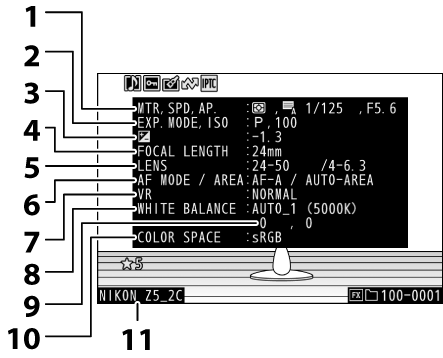
Metering (0Metering)
Shutter type (0d6: Shutter type)
Shutter speed (0S (Shutter-Priority Auto), M (Manual))
Aperture (0A (Aperture-Priority Auto), M (Manual))
Shooting mode (0Choosing a Shooting Mode)
ISO sensitivity (0ISO Sensitivity) 1
Exposure compensation value (0Exposure Compensation)
Optimal exposure tuning (0b6: Fine-tune optimal exposure) 2
- Focal length
- Lens data
Focus mode (0Focus Mode)
AF-area mode (0AF-Area Mode)
- Vibration reduction (0Vibration reduction)
- White balance (0White Balance) 3
- White balance fine-tuning (0Fine-Tuning White Balance)
- Color space (0Color space)
- Camera name
Displayed in red if the picture was taken with auto ISO sensitivity control enabled.
Displayed if Custom Setting b6 [Fine-tune optimal exposure] has been set to a value other than zero.
Also includes the color temperature for pictures taken using 4 [Auto], D [Natural light auto], or L [Preset manual].
Flash Data
Displayed only if photo was taken with optional flash unit (0‘On-Camera’ Versus ‘Remote’, What Is Remote Flash Photography?).
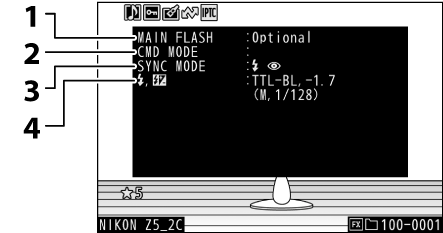
- Flash type
- Remote flash control
- Flash mode (0Flash Modes)
Flash control mode (0Flash Control Mode)
Flash compensation value (0Flash Compensation)
Picture Control/HLG Data
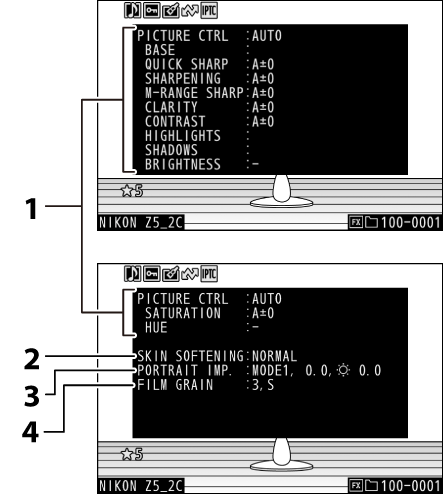
Picture Control (0Picture Controls) 1
HLG Picture Control (0Set Picture Control (HLG)) 1
HLG quality (0HLG quality)
- Skin softening (0Skin softening)
- Portrait impression balance (0Portrait impression balance) 2
- Film grain options (0Film grain options)
The items displayed vary with the Picture Control in effect when the picture was taken.
Shows the selected mode and fine-tuning value.
Other Shooting Data
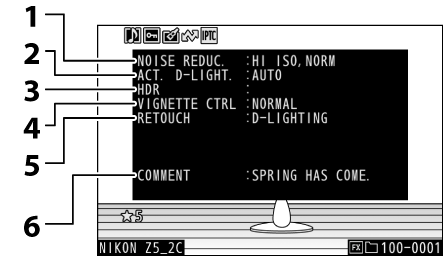
High ISO NR (0High ISO NR)
Long-exposure noise reduction (0Long exposure NR)
- Active D-Lighting (0Active D-Lighting)
- HDR strength (0HDR overlay)
- Vignette control (0Vignette control)
- History of retouches made using [Retouch] option in playback i menu (0Retouching Photographs). Changes are listed in the order applied.
- Image comment (0Image comment)
Copyright Information
Copyright information is only displayed if recorded using the [Copyright information] item in the setup menu at the time the picture was taken.
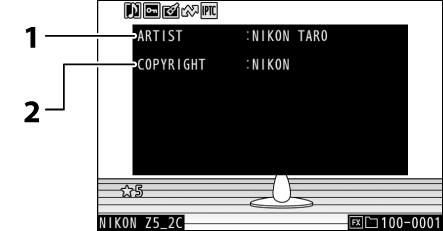
- Photographer (0Copyright information)
- Copyright holder (0Copyright information)
Location Data
Location data including the latitude and longitude must be downloaded from a smart device and is displayed only if embedded in the picture when it is taken.
- The items listed vary with the smart device from which the data were acquired.
- The location data recorded with videos are those reported at the start of recording.
- Note that the camera may be unable to download or display location data from smart devices depending on the version of the device operating system and/or SnapBridge app used.
IPTC Data
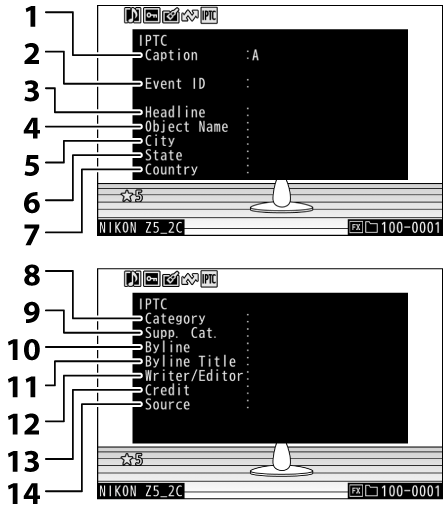
- Caption
- Event ID
- Headline
- Object name
- City
- State
- Country
- Category
- Supp. Cat. (supplemental categories)
- Byline
- Byline title
- Writer/Editor
- Credit
- Source